Compact Firewalls for Offices and Branches
14 models for offices and branches
By Denis Batrankov · October 2026
I start with daily management tasks. Who will change a rule, find a blocked connection and restore the office network after a failure? Test these tasks while the firewall carries normal traffic with all required security checks enabled. Check both speed and ease of use. Then decide which model to buy.
In this article, NGFW means a firewall with application control and intrusion prevention. Application control identifies applications and applies rules to their traffic. Intrusion prevention (IPS) detects threats and can block the traffic. Identity rules, antivirus, web filtering, an HTTP proxy, TLS inspection and sandboxing are separate features in the tables. pfSense Plus, OPNsense and IPFire need the listed packages and settings. The operating-system name does not tell you which checks are active.
These fourteen platforms serve offices and branch networks. Decide who will manage the firewall, which checks must run together and how staff will reconnect after a firewall or internet-provider failure.

The photographs use the same approximate width scale. They have been arranged for the illustration. The IPFire width marked ≈ is an estimate for the layout, not a confirmed front-panel measurement.
Start with your office network
A small office can generate heavy network traffic. Video meetings, cloud applications, file transfers, remote access and guest Wi-Fi may all use the same internet connection. Application control, IPS and TLS inspection add more work for the firewall. Test these services together under normal traffic.
Before choosing a model, list the applications, required security checks, connections that must continue during a failure and person responsible for changes. Use that list to build the test configuration. Run the test on the software version you plan to install.
Ask the supplier these five questions:
- Support: who will answer during your working hours, and who can safely change the settings?
- Replacement: how will the supplier replace this model, and how long will it take?
- Connectivity: how will the main and backup internet services connect, and has switching between them been tested?
- Ownership: who owns the accounts, licences, administrator access and configuration backups?
- Total cost: what does the complete three-year proposal include - hardware, subscriptions, management, installation and support?
Ask for a written answer for the exact part number. Another model in the same family may have a cellular modem, second power input or standby feature that your chosen model lacks.
Fourteen firewalls, five comparisons
All five tables list the models in the same order. Each entry applies to the named hardware, operating system and settings.
No means the named model or operating system does not support the feature. Not published means the vendor does not provide that hardware detail or test result. Not published separately means there is no result for that feature combination alone. Not confirmed means the documents do not confirm the specific feature. Some features also need a subscription. Read the MX67C support dates before ordering.
1. Hardware and connections
Choose how you will manage the firewall before comparing models.
- Enterprise branch NGFWs for the same policy across offices. FortiGate 70G, Palo Alto PA-505, Check Point Spark 2530 and Cisco Firepower 1010 with FTD.
- Compact firewalls with several security services (UTM), or cloud management. Cisco Meraki MX67C, Sophos XGS 108, WatchGuard T125, SonicWall TZ280, Zyxel USG FLEX 200H and Stormshield SN-S-220.
- Routing and systems that engineers configure from separate components. Juniper SRX300, Netgate 4200 MAX / pfSense Plus, DECISO DEC697 / OPNsense and IPFire Mini (2025). SRX300 includes vendor security services. For the package-based systems, specify which components will check and block traffic.
| Device | Chassis and network ports | Processor, memory and storage | Power and cooling | Cellular connectivity |
|---|---|---|---|---|
 Check Point Spark 2530 |
210 mm wide; 6 × 1GbE RJ-45 + 2 × 1GbE combo RJ-45/SFP | Not published | 1 PSU | Cellular variants: 2550/2570 |
 Cisco Firepower 1010 / FTD |
199.4 mm wide; 8 × 1GbE RJ-45; 2 PoE+ ports | 200 GB storage | 1 PSU · Fanless | External Ethernet connection |
 Cisco Meraki MX67C |
239 mm wide; 4 × 1GbE LAN + 1 × 1GbE WAN; one LAN port can be reassigned | Not published | 1 PSU | Integrated LTE Cat 6 |
 DECISO DEC697 / OPNsense |
185 × 134 × 22 mm; 4 × 2.5GbE | Four-core AMD G-Series, up to 1.8 GHz; 8 GB DDR3; 256 GB NVMe | 1 PSU · Fanless | External Ethernet connection |
 FortiGate 70G |
216 mm wide; 10 × 1GbE RJ-45 | FortiSP5 ASIC; RAM/storage not published | 1 PSU · Fanless | Cellular models are separate appliances |
 Juniper SRX300 |
321.06 mm wide; 6 × 1GbE RJ-45 + 2 × 1GbE SFP | 4 GB RAM; 8 GB flash | 1 PSU · Fanless | LTE Mini-PIM unsupported on SRX300 |
 Lightning Wire Labs IPFire Mini (2025) |
183 × 168 × 32 mm (dimension order not confirmed); 4 × Intel I226-V 2.5GbE | Four-core Celeron Elkhart Lake, 2 GHz; 8 GB RAM; 128 GB NVMe | Fanless | No built-in modem; external USB/Ethernet |
 Netgate 4200 MAX / pfSense Plus |
220 × 180 × 60 mm; 4 independent 2.5GbE ports | Four-core Atom C1110, 2.1 GHz; 4 GB LPDDR5; 128 GB NVMe | 1 PSU · Fanless | External Ethernet connection |
 Palo Alto Networks PA-505 |
242.06 mm wide; 7 × 1GbE data ports + separate 1GbE management | 128 GB storage | 1 PSU · Fanless | No integrated modem; PA-520-5G is a separate model |
 SonicWall TZ280 |
225 mm wide; 8 × 1GbE RJ-45 + 2 × 1GbE SFP | Not published | 1 PSU | Compatible external USB modem |
 Sophos XGS 108 |
260 mm wide; 6 × 2.5GbE RJ-45 + 1 × 1GbE SFP | 64 GB UFS 2.1 | 2 PSUs · Fanless | External Cellular WAN; check compatibility |
 Stormshield SN-S-220 |
210 mm wide; 8 × 2.5GbE copper + 1 × 1GbE SFP | Not published | 2 PSUs · Fanless | External USB 4G modem |
 WatchGuard Firebox T125 |
210 mm wide; 1 × 2.5GbE + 4 × 1GbE | Quad-core MT7988A A73, 1.1 GHz; 4 GB DDR4; 16 GB eMMC | 1 PSU | Compatible external USB modem |
 Zyxel USG FLEX 200H |
272 mm wide; 2 × 2.5GbE + 6 × 1GbE | Not published | 1 PSU · Fanless | No built-in modem; external Ethernet gateway |
Power, cooling and deployment
The PSU count shows how many power supply units the firewall can accept. It includes an optional second adapter where the model supports one. Order that adapter separately if it is not included. Fanless means the device has no cooling fan.
A fanless firewall still needs space for air to move around it. Check the required clearances and operating temperature before placing it in a cabinet. An air-conditioned room can still contain a hot cabinet.
- Network ports
- Draw the connections for internet access (WAN), the local network (LAN) and a standby firewall (HA). Count the physical ports you need before choosing a model.
- Power recovery
- Connect both the firewall and the internet-provider equipment to the uninterruptible power supply (UPS). Keep a configuration backup and the correct spare power adapter where support staff can access them.
2. Application control, intrusion prevention and identity
| Device | Application control | Intrusion prevention | User identity | Antivirus |
|---|---|---|---|---|
| Check Point Spark 2530 | Yes | Yes | AD Query / Identity Collector | Check Point antivirus |
| Cisco Firepower 1010 / FTD | Yes | Yes | ISE / Active Directory | Malware Defense / AMP |
| Cisco Meraki MX67C | Yes | Yes | Active Directory; mode restrictions apply | AMP; depends on subscription |
| DECISO DEC697 / OPNsense | Zenarmor; depends on edition | Suricata; selected rules | Zenarmor; depends on edition | ClamAV + C-ICAP plugins for proxy traffic |
| FortiGate 70G | Yes | Yes | FSSO / groups | FortiGuard antivirus |
| Juniper SRX300 | Yes | Yes | User Role Firewall | Sophos cloud antivirus; local Avira unsupported |
| Lightning Wire Labs IPFire Mini (2025) | No | Suricata; selected rules | No | ClamAV add-on (proxy traffic) |
| Netgate 4200 MAX / pfSense Plus | OpenAppID package | Snort package; configure IPS mode | No for transit traffic (VPN/captive portal only) | No (Squid/ClamAV packages deprecated) |
| Palo Alto Networks PA-505 | App-ID | Threat Prevention / Advanced Threat Prevention | User-ID / Cloud Identity Engine | PAN-OS antivirus; Advanced WildFire adds analysis |
| SonicWall TZ280 | Yes | Yes | SSO / groups | Gateway Anti-Virus |
| Sophos XGS 108 | Yes | Yes | STAS / Active Directory | Sophos / Avira |
| Stormshield SN-S-220 | Yes | Yes | SSO / groups | ClamAV / Bitdefender on SNS 4.6+ |
| WatchGuard Firebox T125 | Yes | Yes | Active Directory SSO | Gateway AntiVirus / IntelligentAV |
| Zyxel USG FLEX 200H | Yes | Yes | Users in policy rules | Zyxel Anti-Malware |
Test all required security components
For a system built from packages, compare the complete configuration. An application-identification package still needs rules that allow or block traffic. An intrusion detection system (IDS) can report an attack without blocking it. Set up prevention mode if you need blocking.
3. Web control and sandboxing
| Device | URL filtering | HTTP Proxy | TLS Inspection | Sandbox Integration |
|---|---|---|---|---|
| Check Point Spark 2530 [3] | Cloud categories | No | Yes | Threat Emulation |
| Cisco Firepower 1010 / FTD [4] | Talos categories and reputation | No | Yes | Secure Malware Analytics; file policy |
| Cisco Meraki MX67C [5] | Talos; HTTPS domain filtering without decryption | No | No on MX67C | Secure Malware Analytics |
| DECISO DEC697 / OPNsense [13] | Zenarmor or configured proxy filtering | Forward / Reverse / Transparent | Squid plugin; needs separate settings | No native integration |
| FortiGate 70G [1] | FortiGuard categories | Forward / Transparent | Yes | FortiSandbox |
| Juniper SRX300 [11] | Local or cloud filtering; verify engine | No | Yes; SSL Proxy | Juniper ATP Cloud / ATP Appliance |
| Lightning Wire Labs IPFire Mini (2025) [14] | URL Filter through proxy | Forward / Reverse / Transparent | No; HTTPS CONNECT without decryption | No native integration |
| Netgate 4200 MAX / pfSense Plus [12] | pfBlockerNG DNSBL package; domain filtering | Reverse | No native outbound TLS inspection | No native integration |
| Palo Alto Networks PA-505 [2] | Advanced URL Filtering / PAN-DB | No | Yes, including TLS 1.3 | WildFire / Advanced WildFire |
| SonicWall TZ280 [7] | Content Filtering Service | No | Yes | Capture ATP |
| Sophos XGS 108 [6] | Categories and custom lists | Forward / Reverse / Transparent | Yes | Zero-Day Protection / Sophos Sandbox |
| Stormshield SN-S-220 [10] | URL / SSL Filtering; licence dependent | Forward / Transparent | Yes | Breach Fighter; through the proxy |
| WatchGuard Firebox T125 [8] | WebBlocker | Forward / Transparent | Yes | APT Blocker |
| Zyxel USG FLEX 200H [9] | Content Filtering / URL Threat Filter | No | Yes | Zyxel Sandboxing |
Web proxies, TLS and sandbox analysis results
A Forward Proxy handles outgoing web requests from office users. For an explicit proxy, users or administrators set its address and port in the browser or operating system. A Reverse Proxy accepts incoming requests for a published web application and sends them to its internal server. A Transparent Proxy intercepts HTTP traffic without proxy settings on each client. The network still needs rules that send traffic through it.
On OPNsense, Squid provides Forward and Transparent modes. HAProxy, nginx or Caddy provides Reverse mode. IPFire uses Squid and the HAProxy add-on. Netgate uses HAProxy for Reverse mode. Sophos uses its Web Application Firewall (WAF). Each path needs the right package, licence and software version.
TLS inspection decrypts HTTPS traffic so security services can read it. An HTTP proxy accepts and sends web requests. Forwarding to an external proxy sends traffic to another server. These functions are different. SSL Forward Proxy on PA-505 and SRX300 provides decryption; SonicWall forwarding needs a separate proxy server.
A DNS block list (DNSBL) blocks domain names. It cannot read the page path inside an encrypted HTTPS request. The TLS Inspection column shows whether the firewall can decrypt that traffic.
- First file transfer
- Check whether the firewall waits for the sandbox result before releasing an unknown file, or sends the first copy and blocks later copies.
- Encrypted files
- Test the decryption settings, file type and transfer protocol together. The sandbox needs access to the file contents. A subscription alone does not provide that access.
Web inspection references and model limits
Check Point Spark 2530
- TLS inspection
- Yes
- HTTP Proxy
- No
- URL Filtering
- Cloud categories
- Sandbox Integration
- Threat Emulation
- Configuration and limits
- HTTPS Inspection and Threat Emulation are separate services. The HTTP Proxy column refers to a proxy that accepts client web requests, not traffic inspection alone.
- Documentation
- Vendor specifications
Cisco Firepower 1010 / FTD
- TLS inspection
- Yes
- HTTP Proxy
- No
- URL Filtering
- Talos categories and reputation
- Sandbox Integration
- Secure Malware Analytics; file policy
- Configuration and limits
- FTD applies URL and file policies with TLS inspection where configured. Secure Malware Analytics receives supported files under the file policy. Sending a file does not mean the firewall waited for the analysis result before releasing the first copy.
- Documentation
- Vendor specifications
Cisco Meraki MX67C
- TLS inspection
- No on MX67C
- HTTP Proxy
- No
- URL Filtering
- Talos; HTTPS domain filtering without decryption
- Sandbox Integration
- Secure Malware Analytics
- Configuration and limits
- MX67C does not provide the TLS inspection feature documented for newer supported Secure Router platforms. HTTPS domain filtering does not reveal the full page path.
- Documentation
- HTTPS inspection support
DECISO DEC697 / OPNsense
- TLS inspection
- Squid plugin; needs separate settings
- HTTP Proxy
- Forward / Reverse / Transparent
- URL Filtering
- Zenarmor or configured proxy filtering
- Sandbox Integration
- No native integration
- Configuration and limits
- Squid provides Forward and Transparent modes. HAProxy, nginx or Caddy provides Reverse mode. Suricata IPS, Zenarmor application control and TLS inspection through the proxy each need their own settings. The standard installation has no built-in sandbox connection.
- Documentation
- Proxy documentation; Reverse proxy plugins
FortiGate 70G
- TLS inspection
- Yes
- HTTP Proxy
- Forward / Transparent
- URL Filtering
- FortiGuard categories
- Sandbox Integration
- FortiSandbox
- Configuration and limits
- Explicit Web Proxy and inspection through the proxy depend on the FortiOS version and features supported on 70G. FortiSandbox has separate settings for sending files and acting on results.
- Documentation
- Vendor specifications
Juniper SRX300
- TLS inspection
- Yes; SSL Proxy
- HTTP Proxy
- No
- URL Filtering
- Local or cloud filtering; verify engine
- Sandbox Integration
- Juniper ATP Cloud / ATP Appliance
- Configuration and limits
- SSL Proxy decrypts TLS for security inspection. The HTTP Proxy column refers to client web access, not TLS decryption.
- Documentation
- Vendor specifications
Lightning Wire Labs IPFire Mini (2025)
- TLS inspection
- No; HTTPS CONNECT without decryption
- HTTP Proxy
- Forward / Reverse / Transparent
- URL Filtering
- URL Filter through proxy
- Sandbox Integration
- No native integration
- Configuration and limits
- URL Filter uses the web proxy. HTTPS CONNECT exposes the destination domain, not decrypted paths or file contents. ClamAV is an add-on for proxy traffic when configured for file scanning. The standard IPFire installation has no native sandbox connector.
- Documentation
- URL Filter; ClamAV add-on
Netgate 4200 MAX / pfSense Plus
- TLS inspection
- No native outbound TLS inspection
- HTTP Proxy
- Reverse
- URL Filtering
- pfBlockerNG DNSBL package; domain filtering
- Sandbox Integration
- No native integration
- Configuration and limits
- pfBlockerNG filters domains through DNSBL. It does not decrypt HTTPS or inspect full URL paths and query strings. The standard pfSense Plus installation has no native sandbox integration. HAProxy provides Reverse mode. Do not build a new antivirus design around the deprecated Squid/ClamAV proxy packages.
- Documentation
- pfBlockerNG; Proxy packages
Palo Alto Networks PA-505
- TLS inspection
- Yes, including TLS 1.3
- HTTP Proxy
- No
- URL Filtering
- Advanced URL Filtering / PAN-DB
- Sandbox Integration
- WildFire / Advanced WildFire
- Configuration and limits
- SSL Forward Proxy decrypts outgoing TLS traffic. It does not provide an HTTP proxy for client web access. The PA-500 datasheet describes inspection of incoming and outgoing TLS traffic, including TLS 1.3. Advanced WildFire is a separate subscription.
- Documentation
- Vendor specifications
SonicWall TZ280
- TLS inspection
- Yes
- HTTP Proxy
- No
- URL Filtering
- Content Filtering Service
- Sandbox Integration
- Capture ATP
- Configuration and limits
- Web Proxy Forwarding directs traffic to an external proxy server. DPI-SSL inspects TLS traffic on the firewall. It does not create a built-in browser proxy.
- Documentation
- External proxy forwarding
Sophos XGS 108
- TLS inspection
- Yes
- HTTP Proxy
- Forward / Reverse / Transparent
- URL Filtering
- Categories and custom lists
- Sandbox Integration
- Zero-Day Protection / Sophos Sandbox
- Configuration and limits
- The web proxy and DPI engine check traffic through different paths. Reverse mode uses Web Application Firewall rules and needs the relevant licence.
- Documentation
- Vendor specifications
Stormshield SN-S-220
- TLS inspection
- Yes
- HTTP Proxy
- Forward / Transparent
- URL Filtering
- URL / SSL Filtering; licence dependent
- Sandbox Integration
- Breach Fighter; through the proxy
- Configuration and limits
- SNS provides explicit and transparent HTTP proxying and SSL inspection. Breach Fighter performs sandboxing through the proxy for supported flows.
- Documentation
- Vendor specifications
WatchGuard Firebox T125
- TLS inspection
- Yes
- HTTP Proxy
- Forward / Transparent
- URL Filtering
- WebBlocker
- Sandbox Integration
- APT Blocker
- Configuration and limits
- HTTP/HTTPS proxy policies and the explicit proxy provide web inspection. The proxy policy and enabled service control which files APT Blocker checks.
- Documentation
- Vendor specifications
Zyxel USG FLEX 200H
- TLS inspection
- Yes
- HTTP Proxy
- No
- URL Filtering
- Content Filtering / URL Threat Filter
- Sandbox Integration
- Zyxel Sandboxing
- Configuration and limits
- Content Filtering, HTTPS inspection and Zyxel Sandboxing are security services with their own policies and licences. They do not supply an HTTP proxy for client web access.
- Documentation
- Vendor specifications
4. Management and continuity
| Device | Local management | Central or cloud management | Active/passive resilience | WAN features |
|---|---|---|---|---|
| Check Point Spark 2530 | Local WebUI | Spark management / Management Server / Smart-1 Cloud | Yes; matching devices and appropriate licences | Depends on release and management mode |
| Cisco Firepower 1010 / FTD | Firepower Device Manager | Firewall Management Center; self-hosted or cloud options | Yes; switch-port restrictions apply | FTD - depends on version and manager; No in ASA |
| Cisco Meraki MX67C | Limited status page | Dashboard required for policy management | Warm Spare - powered-on standby unit (hot standby) | Auto VPN; LTE restrictions apply |
| DECISO DEC697 / OPNsense | Web interface and console | OPNcentral with Business Edition; Zenarmor managed separately | CARP / pfsync; two appliances | Multi-WAN |
| FortiGate 70G | Web interface and CLI | FortiManager / FortiGate Cloud; optional | Yes | Secure SD-WAN |
| Juniper SRX300 | J-Web and CLI | Security Director / Security Director Cloud; optional | Chassis cluster; allocate ports | Verify current orchestration and licences |
| Lightning Wire Labs IPFire Mini (2025) | Web interface and console | No | No | No (WAN failover only) |
| Netgate 4200 MAX / pfSense Plus | WebConfigurator, console and SSH | Netgate Nexus; a standalone device needs no extra management server | CARP / pfsync; network requirements apply | Multi-WAN |
| Palo Alto Networks PA-505 | Web interface and CLI | Panorama / Strata Cloud Manager | Yes; data ports used for HA | Advanced SD-WAN; licence and version dependent |
| SonicWall TZ280 | Web interface and CLI | Network Security Manager; SaaS or self-hosted | Yes; verify pair and licence requirements | Secure SD-WAN |
| Sophos XGS 108 | Web interface and CLI | Sophos Central; optional | Cellular WAN must be disabled for HA | SD-WAN with latency and loss criteria |
| Stormshield SN-S-220 | SNS web interface | Stormshield Management Center; self-hosted, optional | Yes | SD-WAN |
| WatchGuard Firebox T125 | Fireware Web UI / WSM | WatchGuard Cloud / WSM; choose deployment mode | FireCluster; model restrictions apply | SD-WAN |
| Zyxel USG FLEX 200H | Web Configurator and CLI | Nebula; optional | Device HA Pro | Multi-WAN / VPN |
Management responsiveness under working load
Warm Spare is Cisco Meraki's name for a powered-on standby firewall, also called hot standby. One device handles traffic; the standby device takes over after a failure. The spare must be the same MX model and regional version. Meraki describes the standby setup and test procedure.
Ask the support engineer to change a rule, find why a connection was blocked and restore a saved configuration. Use the proposed management system while normal traffic and the required security checks are running. Record how long each task takes.
The Reddit links below describe individual user experiences. They are not my tests, and they do not rank the products. Each report has limits, which are listed with it.
- Cisco Firepower 1010 / FDM - 30 January 2026
- A user reports slow rule updates through FDM on 1010. The report gives no FTD version or measured times.
- Meraki Dashboard - 17 September 2026
- A user reports slow page changes from several computers and internet providers on cloud server group n627. Another user reports no problem. This does not measure the MX67C firewall.
- WatchGuard Cloud - 4 December 2025
- A user reports that opening the rules takes 14-25 seconds with 30-176 rules configured. The report does not name the firewall models or cause.
- Sophos SFOS - 14 August 2025
- A user reports that interface pages take several seconds to open in the home edition, installed directly on hardware and in virtual machines, across versions 19-21.5. The report does not test XGS 108 hardware.
- PAN-OS 11 - 21 April 2024
- Users report menu delays on several platforms. Another user reports no problem on a PA-440 with few settings. Neither report measures PA-505.
- FortiWiFi 60F / FortiOS 7.6.6 - 17 February 2026
- A user reports a slow web interface after several days. Restarting the web service, httpsd, temporarily resolves it. The device is FWF60F, not FortiGate 70G.
- SonicWall NSM 4.2 / SaaS - 3 July 2026
- A user reports waiting more than a minute with many rules and objects on NSA/NSsp. The report concerns central management, not the TZ280 local interface.
- Juniper SRX300 / J-Web - 22 May 2022
- A home-lab user reports slow J-Web and recommends the command line (CLI). The report gives no Junos version or measured times.
How to test management speed in a pilot
Use the software you plan to install, the expected number of rules and objects, and logs with real events. A fast empty system proves little. Test the configuration you will actually use.
- Open the rules and an object ten times. Record the first response, the middle result (median) and the longest response time. Repeat from another workstation on the management network.
- Change and deploy a rule. Measure saving the change, sending it to the firewall and applying it as three separate steps. Send test traffic to check when the new rule starts working.
- Find an event in a working day's logs. Record the log size and search filters. Search both recent and archived events while another administrator changes rules.
- Repeat under inspection load. For a manager on your own server, record CPU, RAM, disk response time and network delay. For cloud management, record the service region, time and browser.
- Disconnect management and restore it. Check whether traffic continues, which local settings remain available, and how to restore earlier settings and missing logs. Restore the saved configuration to a spare firewall.
Agree the maximum response and recovery times in seconds. A backup internet connection protects against a connection failure. A second firewall protects against a device failure. Test both failures before accepting the system.
5. Performance: read the test conditions
The vendors measured the figures below under different test conditions. They are not results from one shared test. Read the conditions before comparing the numbers.
Test abbreviations. FW means firewall, AV means antivirus, and URLF means URL filtering. Layer 4 checks connection details such as addresses, ports and protocol; Layer 7 examines applications and their content. IDPS combines intrusion detection and prevention.
Units. Throughput uses Mbps (megabits per second) throughout. Packet sizes use bytes; HTTP object sizes use KB or MB. These object sizes are amounts of data, not KB/s or MB/s transfer rates. Eight bits make one byte, so changing Mbps to MB/s would change the figures. The tables keep the published values.
What the test names mean
- Threat Prevention and Threat Protection
- These are vendor labels for groups of security checks, not standard test methods. Check Point's Threat Prevention includes FW, AppControl, IPS, URLF, AV, Anti-Bot, SandBlast and logging. Fortinet's Threat Protection includes FW, IPS, AppControl and Malware Protection. Juniper's Secure Web Access adds SecIntel and URL Filtering to its NGFW profile, but no AV. Compare the enabled checks, not just the label.
- Threat Emulation
- Check Point uses this name for a sandbox service that tests file behaviour. It is not a name for the complete firewall feature set. Check Point explains the file-analysis process.
- Application override
- In PAN-OS, this assigns an application label using rule conditions instead of normal App-ID identification. It can bypass deep Layer 7 (application-level) processing and threat inspection. Read the enabled inspection settings before using such a test result. Palo Alto Networks documents the inspection limits.
- Bidirectional, or bidir
- Traffic travels in both directions. Check whether the quoted throughput adds both directions together.
- IMIX, Enterprise Mix and appmix
- These names describe mixes of packets or application traffic. The mix and transaction sizes can differ between vendors. The same word does not mean the same test.
| Device | Layer 4 firewall | Application control + IPS | Content-inspection figure | Measurement context |
|---|---|---|---|---|
| Check Point Spark 2530 [3] | 3000 (UDP 1518 bytes) | 1200 (NGFW) | 750 (Threat Prevention) | L4 uses UDP 1518-byte frames, RFC lab test. NGFW enables FW, AppControl, IPS and logging; Threat Prevention adds URLF, AV, Anti-Bot and SandBlast. The document does not give the security test traffic profile. |
| Cisco Firepower 1010 / FTD [4] | 2000 (ASA only) | 880 (FTD: FW + AVC + IPS) | Not published separately | ASA stateful firewall and FTD FW + AVC + IPS are different images and inspection profiles. The 880 Mbps result does not include antivirus automatically. |
| Cisco Meraki MX67C [5] | 600 (stateful FW) | Not published separately | 300 (Advanced Security) | MX Family Datasheet. Stateful firewall and Advanced Security are separate profiles; the summary does not disclose transaction sizes or an separate AppControl + IPS result. |
| DECISO DEC697 / OPNsense [13] | 5000; 2300 port-to-port | Not published separately | Not published separately | TCP firewall, 1500-byte packet basis. Suricata IPS is about 541 Mbps with roughly 35,000 rules, measured separately from application control. |
| FortiGate 70G [1] | 10,000 (UDP 1518/512/64 bytes) | 1500 (NGFW) | 1300 (Threat Protection, Enterprise Mix) | NGFW enables FW, IPS and AppControl; Threat Protection adds Malware Protection. Both use Enterprise Mix with logging. L4 uses the three stated UDP frame sizes. |
| Juniper SRX300 [11] | 1900 (UDP 1518 bytes); 600 IMIX | 226 (NGFW, HTTP 64 KB) | 171 (Secure Web Access, no AV) | L4 uses UDP/RFC 2544. NGFW enables FW, Application Security and IPS with 64 KB HTTP transactions; Secure Web Access adds SecIntel and URL Filtering, not antivirus. |
| Lightning Wire Labs IPFire Mini (2025) [14] | ~2400 (fireperf) | Not published separately | Not published separately | Firewall throughput measured with fireperf. The result is not an IPS or combined inspection measurement. |
| Netgate 4200 MAX / pfSense Plus [12] | 8610 TCP; 3210 IMIX | Not published separately | Not published separately | pfSense Plus 23.09.1; firewall with 10,000 ACLs. TCP/IPERF3 and IMIX are different traffic profiles. |
| Palo Alto Networks PA-505 [2] | Not published separately (1200 with App-ID) | Not published separately | 800 (Threat Prevention, appmix, PAN-OS 12.2) | The 1200 Mbps firewall result includes App-ID and logging. Threat Prevention adds IPS, antivirus, anti-spyware, WildFire and file blocking. This test profile does not include TLS inspection. |
| SonicWall TZ280 [7] | 2500 (Firewall Inspection) | Not published separately (IPS 1500, App 1500 standalone) | 1000 (Threat Prevention) | Official TZ280 comparison lists Firewall Inspection, IPS, Application Inspection and Threat Prevention separately. It does not disclose the packet profile here or a combined AppControl + IPS result. |
| Sophos XGS 108 [6] | 12,500 HTTP; 8100 IMIX | 2600 (NGFW, 512 KB HTTP) | 2500 (Threat Protection, Enterprise Mix) | Firewall and NGFW use 512 KB HTTP responses; NGFW enables IPS and AppControl. Threat Protection uses FW, IPS, AppControl and malware prevention on Enterprise Traffic Mix. IMIX is UDP. |
| Stormshield SN-S-220 [10] | 10,000 UDP; 4000 IMIX | Not published separately (IPS 2000 IMIX) | 740 (Threat Prevention, realistic mix) | SNS 5.x; UDP 1518-byte frames. Threat Prevention enables FW, IPS, AV, IP reputation, web application protection and logging on a realistic traffic mix. |
| WatchGuard Firebox T125 [8] | 2280 (Firewall) | Not published separately (IPS 725 standalone) | 510 (UTM Full Scan) | Official Solution Guide, page 17. Firewall, IPS and UTM are different test settings; this summary does not disclose packet sizes or a separate combined AppControl + IPS test. |
| Zyxel USG FLEX 200H [9] | 6500 (UDP 1518 bytes) | Not published separately (IPS 2500 standalone) | 1800 (UTM: Anti-Malware Express + IDP) | uOS 1.31+; firewall uses RFC 2544. UTM uses multiple HTTP flows with 1460-byte packets and Anti-Malware Express plus IDP. It is not a separate AppControl + IPS test. |
Throughput with security enabled
Cisco lists 2000 Mbps for the Firepower 1010 stateful firewall with ASA, and 880 Mbps for FW + AVC + IPS with FTD. ASA and FTD are different software images with different checks. The ASA figure cannot size the FTD configuration. Its listed inspection speed is below gigabit.
Sophos XGS 108 lists 2500 Mbps of Threat Protection on Enterprise Traffic Mix. Its separate 2600 Mbps NGFW test uses 512 KB HTTP objects. Zyxel 200H lists 1800 Mbps UTM with Anti-Malware Express and IDP on several HTTP flows. PA-505 lists 800 Mbps Threat Prevention on appmix. FortiGate 70G lists 1300 Mbps on Enterprise Mix. Object sizes, connection rates, checks and logging differ. These figures do not provide a ranking.
Sophos describes FastPath as a way to move eligible safe flows to a faster processing path. The published test method does not say this explains the 2500 Mbps Threat Protection result. Keep that feature separate from the test conditions.
The PA-505 datasheet also lists 1200 Mbps with App-ID and logging, and 400 Mbps IPsec VPN throughput. The 1200 Mbps figure is not a separate Layer 4 test. The 800 Mbps Threat Prevention figure does not measure TLS decryption.
A 2.5GbE port gives the interface speed. It does not give the speed with all security checks active. In the pilot, enable the required checks, logging and VPNs together. Measure delay, packet loss, new connections and application response time while an administrator uses the manager.
- Cleartext inspection
- Record which of FW, AppControl, IPS, antivirus and URL filtering run simultaneously.
- HTTPS
- Record TLS versions, cipher suites, object sizes, connection rates and the decryption exceptions.
- VPN and inspection
- Record encryption, packet sizes, tunnel count and checks applied inside the tunnel.
- Working load
- Measure concurrent and new sessions, delay, loss and log writes at the required traffic rate.
Performance sources and measurement profiles
Check Point Spark 2530
- Layer 4 / firewall
- 3000 (UDP 1518 bytes) Mbps
- Application control + IPS
- 1200 (NGFW) Mbps
- Content inspection
- 750 (Threat Prevention) Mbps
- Measurement conditions
- L4 uses UDP 1518-byte frames, RFC lab test. NGFW enables FW, AppControl, IPS and logging; Threat Prevention adds URLF, AV, Anti-Bot and SandBlast. The document does not give the security test traffic profile.
- Official source
- Datasheet or vendor specifications
Cisco Firepower 1010 / FTD
- Layer 4 / firewall
- 2000 (ASA only) Mbps
- Application control + IPS
- 880 (FTD: FW + AVC + IPS) Mbps
- Content inspection
- Not published separately
- Measurement conditions
- ASA stateful firewall and FTD FW + AVC + IPS are different images and inspection profiles. The 880 Mbps result does not include antivirus automatically.
- Official source
- Datasheet or vendor specifications
Cisco Meraki MX67C
- Layer 4 / firewall
- 600 (stateful FW) Mbps
- Application control + IPS
- Not published separately
- Content inspection
- 300 (Advanced Security) Mbps
- Measurement conditions
- MX Family Datasheet. Stateful firewall and Advanced Security are separate profiles; the summary does not disclose transaction sizes or an separate AppControl + IPS result.
- Official source
- Datasheet or vendor specifications
DECISO DEC697 / OPNsense
- Layer 4 / firewall
- 5000; 2300 port-to-port Mbps
- Application control + IPS
- Not published separately
- Content inspection
- Not published separately
- Measurement conditions
- TCP firewall, 1500-byte packet basis. Suricata IPS is about 541 Mbps with roughly 35,000 rules, measured separately from application control.
- Official source
- Datasheet or vendor specifications
FortiGate 70G
- Layer 4 / firewall
- 10,000 (UDP 1518/512/64 bytes) Mbps
- Application control + IPS
- 1500 (NGFW) Mbps
- Content inspection
- 1300 (Threat Protection, Enterprise Mix) Mbps
- Measurement conditions
- NGFW enables FW, IPS and AppControl; Threat Protection adds Malware Protection. Both use Enterprise Mix with logging. L4 uses the three stated UDP frame sizes.
- Official source
- Datasheet or vendor specifications
Juniper SRX300
- Layer 4 / firewall
- 1900 (UDP 1518 bytes); 600 IMIX Mbps
- Application control + IPS
- 226 (NGFW, HTTP 64 KB) Mbps
- Content inspection
- 171 (Secure Web Access, no AV) Mbps
- Measurement conditions
- L4 uses UDP/RFC 2544. NGFW enables FW, Application Security and IPS with 64 KB HTTP transactions; Secure Web Access adds SecIntel and URL Filtering, not antivirus.
- Official source
- Datasheet or vendor specifications
Lightning Wire Labs IPFire Mini (2025)
- Layer 4 / firewall
- ~2400 (fireperf) Mbps
- Application control + IPS
- Not published separately
- Content inspection
- Not published separately
- Measurement conditions
- Firewall throughput measured with fireperf. The result is not an IPS or combined inspection measurement.
- Official source
- Datasheet or vendor specifications
Netgate 4200 MAX / pfSense Plus
- Layer 4 / firewall
- 8610 TCP; 3210 IMIX Mbps
- Application control + IPS
- Not published separately
- Content inspection
- Not published separately
- Measurement conditions
- pfSense Plus 23.09.1; firewall with 10,000 ACLs. TCP/IPERF3 and IMIX are different traffic profiles.
- Official source
- Datasheet or vendor specifications
Palo Alto Networks PA-505
- Layer 4 / firewall
- Not published separately (1200 with App-ID) Mbps
- Application control + IPS
- Not published separately
- Content inspection
- 800 (Threat Prevention, appmix, PAN-OS 12.2) Mbps
- Measurement conditions
- The 1200 Mbps firewall result includes App-ID and logging. Threat Prevention adds IPS, antivirus, anti-spyware, WildFire and file blocking. This test profile does not include TLS inspection.
- Official source
- Datasheet or vendor specifications
SonicWall TZ280
- Layer 4 / firewall
- 2500 (Firewall Inspection) Mbps
- Application control + IPS
- Not published separately (IPS 1500, App 1500 standalone)
- Content inspection
- 1000 (Threat Prevention) Mbps
- Measurement conditions
- Official TZ280 comparison lists Firewall Inspection, IPS, Application Inspection and Threat Prevention separately. It does not disclose the packet profile here or a combined AppControl + IPS result.
- Official source
- Datasheet or vendor specifications
- Datasheet access
- The Gen 8 datasheet landing page is retained in the source list. The model comparison page supplies these numbers; it does not expose the complete test method.
Sophos XGS 108
- Layer 4 / firewall
- 12,500 HTTP; 8100 IMIX Mbps
- Application control + IPS
- 2600 (NGFW, 512 KB HTTP) Mbps
- Content inspection
- 2500 (Threat Protection, Enterprise Mix) Mbps
- Measurement conditions
- Firewall and NGFW use 512 KB HTTP responses; NGFW enables IPS and AppControl. Threat Protection uses FW, IPS, AppControl and malware prevention on Enterprise Traffic Mix. IMIX is UDP.
- Official source
- Datasheet or vendor specifications
Stormshield SN-S-220
- Layer 4 / firewall
- 10,000 UDP; 4000 IMIX Mbps
- Application control + IPS
- Not published separately (IPS 2000 IMIX)
- Content inspection
- 740 (Threat Prevention, realistic mix) Mbps
- Measurement conditions
- SNS 5.x; UDP 1518-byte frames. Threat Prevention enables FW, IPS, AV, IP reputation, web application protection and logging on a realistic traffic mix.
- Official source
- Datasheet or vendor specifications
WatchGuard Firebox T125
- Layer 4 / firewall
- 2280 (Firewall) Mbps
- Application control + IPS
- Not published separately (IPS 725 standalone)
- Content inspection
- 510 (UTM Full Scan) Mbps
- Measurement conditions
- Official Solution Guide, page 17. Firewall, IPS and UTM are different test settings; this summary does not disclose packet sizes or a separate combined AppControl + IPS test.
- Official source
- Datasheet or vendor specifications
Zyxel USG FLEX 200H
- Layer 4 / firewall
- 6500 (UDP 1518 bytes) Mbps
- Application control + IPS
- Not published separately (IPS 2500 standalone)
- Content inspection
- 1800 (UTM: Anti-Malware Express + IDP) Mbps
- Measurement conditions
- uOS 1.31+; firewall uses RFC 2544. UTM uses multiple HTTP flows with 1460-byte packets and Anti-Malware Express plus IDP. It is not a separate AppControl + IPS test.
- Official source
- Datasheet or vendor specifications

An approximate width comparison using original product photography. This picture does not show how to install the devices. Leave the clearances stated by each vendor.
Three purchasing details worth checking early
Product lifecycle. A model can still appear in a comparison even when it is close to the end of sales. Cisco lists 27 November 2026 as the last order date for MX67C and 30 November 2031 as its last support date, subject to the applicable service contract. Use MX67C here as a comparison reference. Review its current replacement before ordering. Also compare Firepower 1010 with Cisco's newer Secure Firewall 1200 family.
Open-platform packages. On OPNsense, check the editions, licences and network interfaces used by Zenarmor and Suricata. Their netmap traffic-processing modes have compatibility limits when both use the same interface. On pfSense Plus, Netgate advises removing its deprecated Squid-related packages because upstream security problems remain unfixed. Do not base a new web-proxy design on those packages.
Local delivery and responsibility. Confirm availability and the supplier's support commitment before ordering. Ask for a written offer with the exact hardware, software, subscriptions, replacement process and owner of administrator access.
Choose and test two models
An office needs working applications, isolated guest access, controlled remote support and a tested recovery procedure. Record those requirements before selecting the appliance.
Choose two models with the right management system, ports and standby design. Test both with the security checks you need. Then compare the full cost over the same period of use.
Before ordering, ask the supplier to demonstrate three tasks on the proposed configuration. Find why a connection was blocked, switch to the backup internet connection, and restore a saved configuration. Record the results in the purchase specification.
Download illustrations and view sources
Download the 4800-pixel comparison or the 2200-pixel stack. Both use English labels and an approximate common width scale.
Scope and image sources
Sources and scope
This comparison uses vendor documents, not results from one shared lab test. Each figure applies to the named model and settings. I reviewed this English edition on 23 October 2026, using the October comparison, the supplied PA-500 Series datasheet and the sources below. Check software versions, subscriptions and support dates again before buying.
- Check Point Quantum Spark 2500 Series datasheet
- Cisco Firepower 1000 Series datasheet
- Cisco Secure Firewall 1200 Series
- Cisco Meraki MX67 / MX68 hardware and capabilities
- Cisco Meraki MX67C / MX68CW lifecycle notice
- DECISO DEC697 product specifications
- FortiGate / FortiWiFi 70G Series datasheet
- Juniper SRX300 hardware specifications
- IPFire Mini specifications, power and throughput
- IPFire Mini hardware documentation
- Netgate 4200 MAX product specifications
- Palo Alto Networks PA-500 Series datasheet
- PA-501 / PA-505 hardware components
- SonicWall TZ Series Gen 8 datasheet
- Sophos Firewall brochure and specifications
- Stormshield SN-S-220 / SN-S-320 datasheet
- WatchGuard Firebox T125 hardware guide
- Zyxel Security Solution Guide
- Zenarmor compatibility FAQ
- Netgate notice on deprecated Squid-related packages
Image credits
Models in the illustration and image sources
The illustrations use original product photographs, cropped to show the network ports. No ports have been generated or reconstructed.
- Check Point Spark 2530 rear panel: Quantum Spark datasheet, page 3
- FortiGate 70G rear view: The Tech Geeks
- Meraki MX67C rear view: Cloud Appliances
- Sophos XGS 108 rear view: Avanet
- SonicWall TZ280 rear view: Etilize product catalogue
- Stormshield SN-S-Series rear view: Stormshield
- WatchGuard T125 rear view: hardware guide
- IPFire Mini rear view: official press images
- Cisco Firepower 1010 original photograph: Router-switch.com
- DECISO DEC697 / OPNsense appliance: DECISO
- Juniper SRX300 original photograph: Router-switch.com
- Netgate 4200 original photograph: Netgate
- Palo Alto PA-505 photograph: PA-500 Series datasheet, page 1
- Zyxel USG FLEX 200H photograph: Zyxel Store
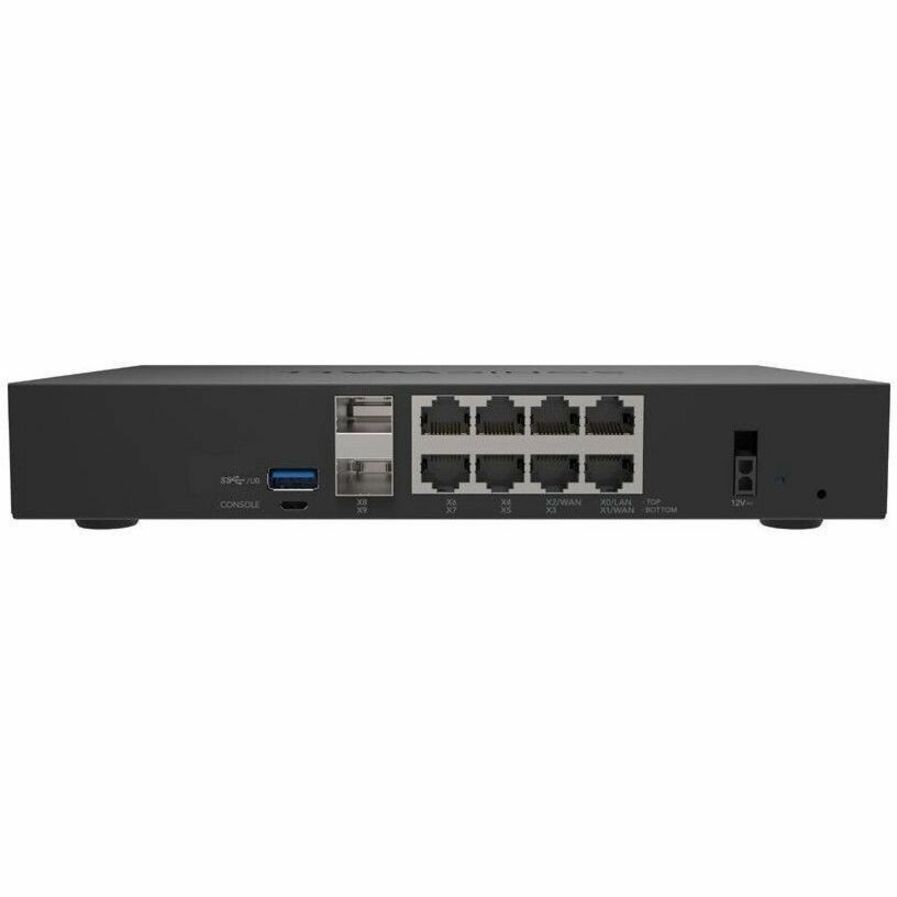
The other photographs are from the manufacturer specifications linked above, including the PA-505 image from the supplied PA-500 Series datasheet.
HTTP Proxy references
- OPNsense reverse-proxy plugins
- OPNsense forward proxy
- OPNsense transparent proxy
- pfSense proxy packages and HAProxy
- IPFire conventional and transparent proxy modes
- IPFire HAProxy add-on
- Sophos web proxy settings
- Sophos WAF reverse proxy
- FortiOS explicit and transparent proxies
- Stormshield transparent and explicit HTTP proxy